
Control context
For a worked example, follow How to edit AI context while keeping past conversations.
Inspect the next request
Before a follow-up, click the “will send ~… tok · … messages” summary line above the input in the node panel. The expanded preview groups the next request into materials, explicit references, and conversation turns, and shows message, file, and token estimates. It previews the next panel follow-up; it is not a separate canvas menu.
Create a context path or reference
- Drag from a node handle to empty canvas space to continue with a new question on the structural path.
- Drag from a node handle to an existing node to add an explicit reference.
- Use an
@mention in an ask box to reference a named node.
Solid wires carry the full upstream conversation path. A purple dashed summary reference carries the referenced node's question and answer plus the upstream question trail, without importing every upstream answer.
Change what enters the request
- Delete a wire to remove that route while leaving both nodes on the canvas.
- Archive a node to keep it stored but exclude it from traversal.
- Select a convertible wire to switch between full structural context and a summary reference. The wire action shows an estimated token difference.
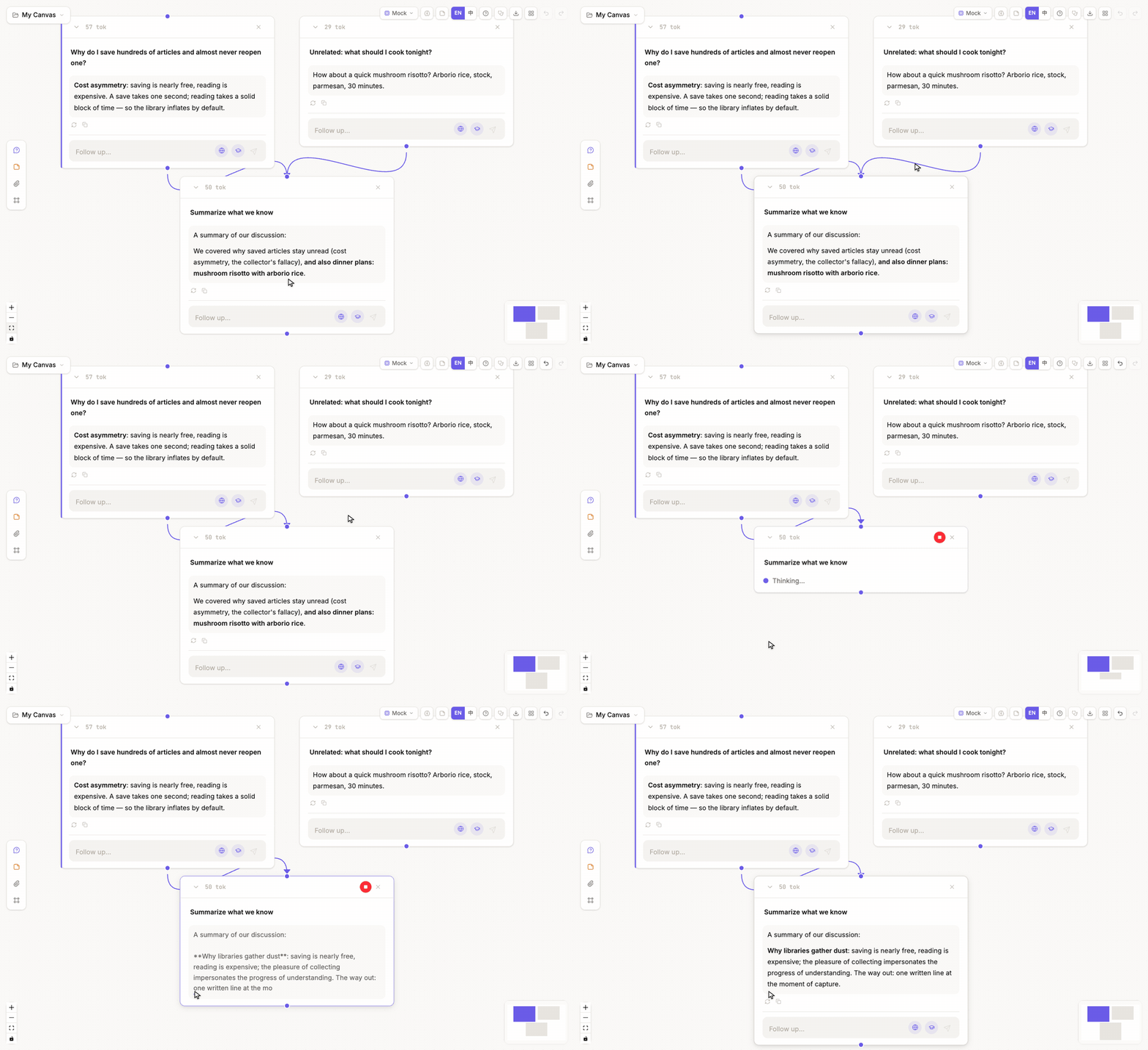
Verify the effect
After changing a wire, use the same question and model to regenerate, then compare the previous and new answer versions. This separates a context intervention from a prompt or model change.
Deleting a wire is not deleting a node: the excluded work remains visible, inspectable, and available to reconnect elsewhere.