
How to edit AI context while keeping past conversations
When a conversation drifts or a specific train of thought is no longer useful, you might want to continue down a different path without deleting the previous discussion, just in case it becomes relevant again.
ThoughtDAG is an open-source AI conversation canvas. Each question and answer is a node; wires define which conversation paths feed into a later question. You can keep the discussion and remove a route into the next request. A node being visible on the canvas does not, by itself, put it in the model’s context.
Start with a clear example
Use ThoughtDAG with a configured model. For this exercise, turn Recall off before creating the nodes and leave other materials out, so you can follow the effect of the wire change.
- Double-click empty canvas space to ask two separate questions: “Why do I bookmark articles but rarely read them?” and “What’s for dinner tonight?”
- Continue from the bookmark node: “Summarize what we talked about.”
- Drag from the dinner node’s handle to the summary node to add a reference.
- Regenerate the summary. Two routes now feed into one node.
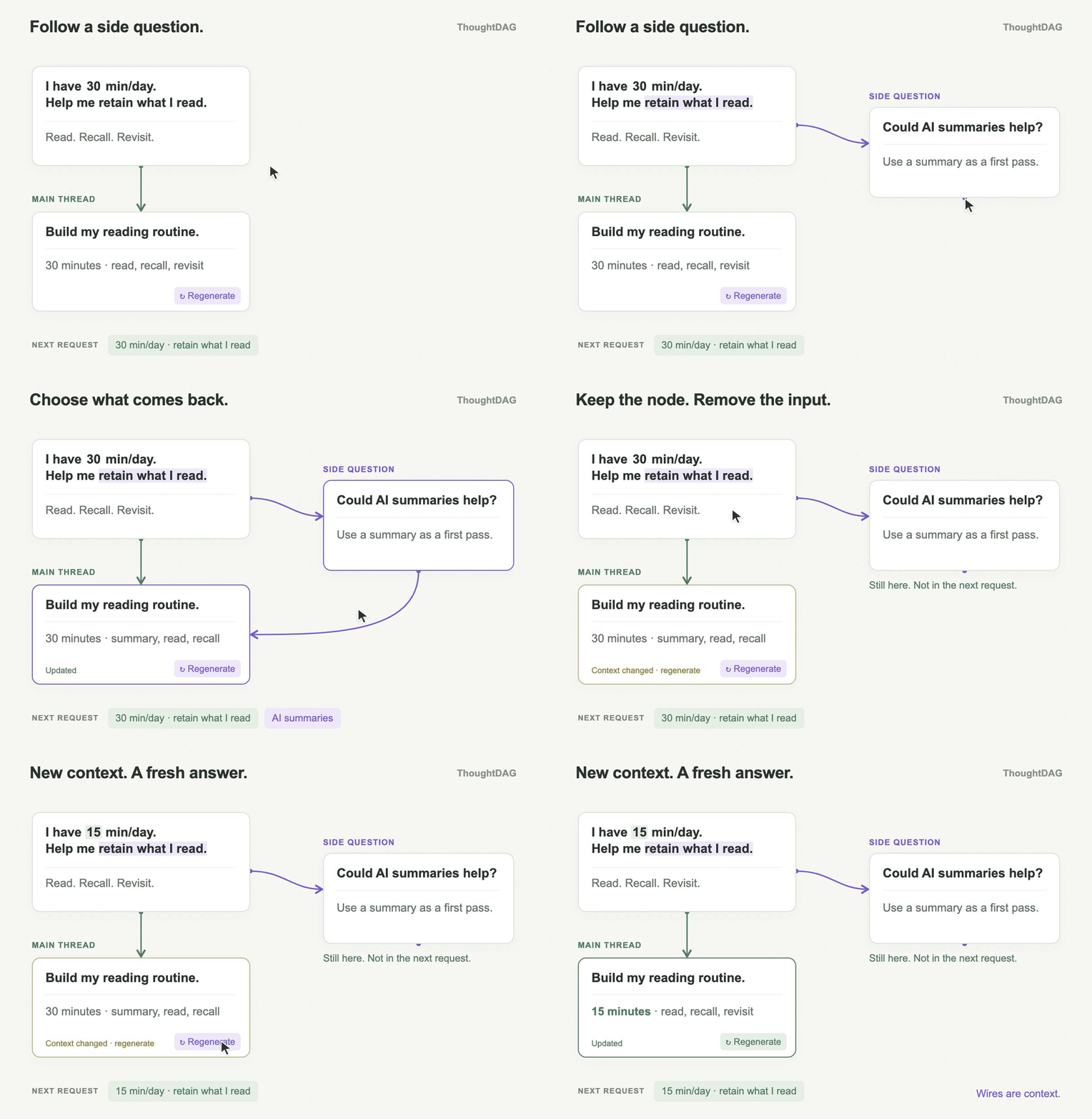
Illustrated reading-plan example: remove the side discussion’s route into the later question, change the daily budget from 30 to 15 minutes, and regenerate. The side discussion stays available. Removing a wire does not rewrite an existing answer; check other input paths as well.
1. Check what carries forward
Double-click the summary node to open its panel. Click “Will send ~… tok · … messages” above the follow-up input. Review the materials, explicit references, and conversation turns to find the dinner route.
The preview shows the current canvas path and estimated tokens. If Recall is enabled, it can add retrieved history when you send; review those recall items separately.
2. Remove the unwanted route
Select the wire connecting the dinner node to the summary node, and delete it. The dinner node remains on the canvas, allowing you to review it or reconnect it later. Deleting a wire only removes that specific route.
Check your connections and the preview again. If the same content is still entering the context via another path, citation, or attachment, you must handle those separately. Additionally, if the existing summary text already repeated the dinner details, those details might still carry forward into subsequent turns. You will need to regenerate or edit the summary node itself to clear it out.
3. Regenerate and continue
Keep the summary question and the model configuration identical, and regenerate the answer for that node. Toggle between the versions to compare the results. Once updated, continue asking follow-up questions from this node, such as: "Give me a 10-minute daily reading schedule."
Check the input context before judging the answer. The same prompt can produce different wording on another run, so a single changed answer is not evidence of better output quality.
The original exploration is still available. You can choose which parts to carry into the next question. The same workflow works for a discarded research assumption or an alternative project plan.
Related guides: Getting started · Context controls · Conversations and branches · Session Atlas